Showing posts with label Developer. Show all posts

Wednesday, March 1, 2017

[Salesforce] ORGanizer Chrome Extension Version 0.5 is live!

Dear ORGanizer users, we have reached beta version 0.5, that means we are half way to version 1.0!

For anyone that doesn't know what the Salesforce ORGanizer Chrome Extension is, download it for free from the Google Web Store and, believe me, you won't be disappointed for sure!

As usual, if you find ORganizer useful please cast a vote on the store!

This release comes with important major and minor new features and several UI fixes.

  • OAuth login
  • Automatic data backup
  • Very Important Queries and Scripts (VIQ and VIS)
  • Other improvements

OAuth login


The ORGanizer allow login with username and password along with token if the Login with token flag is active.

If your company's password policies prevent you from using the ORGanizer to store passwords, from now on you can enable your browser to user OAuth: by requesting an access token the ORGanizer store (only locally and with encryption) an access token so it can requests a valid session Id without knowing the user's password.

This means that you need to authorize every instance of the ORGanizer you have installed, so you need to input password at least once for every laptop you own.

How does it work?

Create or edit a new Account by clicking on the ORGanizer extension icon and select YES in the Login with OAuth (no password) section:

With this configuration the password field is not mandatory.

The first time you try to login with the above user (or if the authorization of the ORGanizer app has been revoked by admin, read later for how this is done) you are redirected to this internal page:


Remember which username you are about to authorize and click the link.

You are then requested for your username and password:


And to authorize the ORGanizer App (in this screenshot you are seeing the stage app):


This app requires web and API access (otherwise the Extension cannot work).

Once authorized you are then redirected in the following page:


where the access is validated and the access / refresh token stored locally (encrypted, no remote syncronization is done). You can proceed with login or simply close the app.

The next time (ever after days) you login with this user you are automatically provided a valid access token to enter in your ORG.

This authorization process occurs while setting up a new connection or when an App in no more authorized in your ORG.

To revoke an access token, jump to Setup > Users > select the user you want to revoke and go to the OAuth Connected Apps section:


Revoke each OAuth token issued (you can find multiple instances of the Connected App).

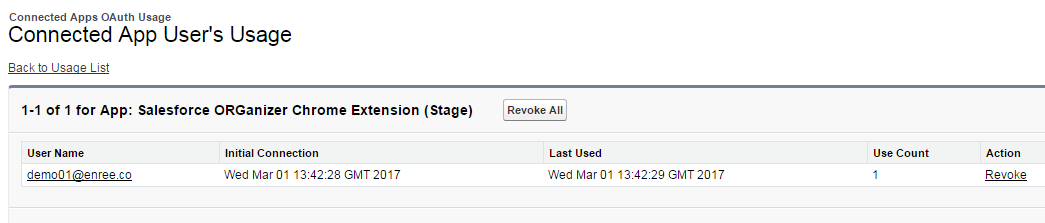
If you want to block the whole Salesforce ORGanizer Chrome Extension Connected App jump to Setup > Connected Apps OAuth Usage:


You can even remove the single user that are using it:


Automatic data backup


On the ORGanizer Chrome Extension's Options page there is a new section:


The extension automagically saves a local copy of current ORGs and Accounts configuration every time you change a value from the Popup (or change encryption password).

You can set the maximum backup stack size (maximum is 100, minimum is 0) and download a specific backup.

Remember that the Reset all data! and Reset all local data! actions affect the backups aswell.

The bigger your ORGs and Accounts configuration is, the bigger is the local storage needed. Keep an eye on the new gauge on the SYNC/LOCAL QUOTA section:


Very Important Queries and Scripts (VIQ and VIS)


You can name queries and scripts you use often in the Very Important Queries and Very Important Scripts sections on the Quick Console.

V.I.Q.


V.I.S.


You can name a new query/script, select a saved one or delete one.

Remember that every query / script is only stored locally and affects the local storage limit seen in the previous chapter.

You can download a backup of all VIQs and VISs in the Options page:


Other improvements


The Quick Describe plugin's search now filters objects based on key prefix:


The Options page now shows a link to the main site FAQ page and every section has a ? link to get some help.


Reset the Quick Console size and position (it can become too wide or can move outside the window if you are playing with Chrome's window):


Tuesday, September 13, 2016

[Salesforce] I wanna be the very best (Salesforce Developer), do you?


I'm sure you do or you'll do after reading this post.


When I started working on Salesforce in 2009 in WebResults (an italian Salesforce Platinum Partner), and at that time I was not aware of what Salesforce actually was.

I thought it was just a coding platform, similar to the one I used to work with in my post-degree experience, with a proprietary language and a lot of point-and-click stuff.

I thought it was my first occupation on my new job and that after a while I certanly would have switched to Java or .NET in few months.

I thought I needed a lot of time to master the platform.

I thought I needed to study over books and guess by myself the solution to whatever problems I may have found, hoping a help from Google.

You know what?

After about 8 years I'm still here talking about Salesforce ahd telling people how awesome it is!


I love coding, I started when I was a child because I was fascinated on how a program worked and how an "IF" statement could lead to a window, a button or whatever you see on your laptop screen: I bought a C++ "brick-book" and finally I understood how lines of codes translates into "screen things"...and I have to admit it's been quite a revelation (I still remember the feeling of power).

This means I love trying new technologies and making them work: I'm not like "the Guru of language X" because I love switching between technologies and find ways of using them whenever possibile.

You can think that Salesforce, as a proprietary platform, is strictly closed to its language and standards but... SUSPANCE...it's the exact opposite my dear reader!

By working with Salesforce I had the chance to put my hands on various languages and standards, from Java to NodeJS, from SOAP to REST, from jQuery to AngularJS, browser extensions, Heroku apps, version control, command line apps...I know it seems crazy but in the last 8 years I've produced thousands of lines of code and a great part of them is pubblicly avaiable on my GitHub account.

Why I'm talking about my GitHub account? Am I that pretentious?

Because the greatest quality of the Salesforce world is that you can find all kind of stuff open sourced, from apps to reusable components (e.g. DeveloperForce Github profile).


And what about the documentation?


You have no need to buy anything, you can find everything online on Salesforce Docs site, thousands of pages written by Salesforce for you to learn every little aspect of the platform...if you still like reading on your books you can even print the docs' PDF or even buy awesome books written by awesome developers!

And what about the community?


Salesforce community is AMAZING!

The entry point is the developer.force.com site: everything you need to start learning to be an awesome Salesforce developer is there!

The community counts on thousands of Salesforce developers, admins and users who share their experience on Forums, the Success Community (a place where you can find people, groups, partners), a dedicated Stack Exchenge community, thousands of Facebook and LinkedIn groups, coutless Twitter discussions, a dedicated #askforce Twitter hashtag to ask for help, blogs all over the net (click on Salesforce Blogs to get a glimpse of the most famous Salesforce blogs...and yes there is even mine), publicly acclaimed MVPs (Salesforce Most Valued Professionals, people awarded for their dedication to the Salesforce cause, and again I'm produly one of them).

And did I mention Trailhead?


Did you get how BIG and IMMENSE Salesforce is? Well...Trailhead is a "Salesforce Tutorial" for wanna be developers, wanna be administrators, wanna be users, wanna be partners, wanna be Salesforce awesome people: earn badges to show your talent and learn having nothing but fun!
You can start here following the suggested trails or you can even build your own trail with the set modules you love the most.

And what if you want to meet people on real life?


Find the Salesforce DUG (Developer User Group) near you and if you are too far you can even create your own city's official one!

And last but not least, you can be part of the DreamForce, the MOST. AMAZING. CONFERENCE. EVER. ... nothing to add more!

Imagine hundreds of thousands people all over the world that meet in San Francisco to share, learn, have fun, get some (ehm...a lot of) swag, chill out in a beatiful city.

Believe me: after DreamForce your life will never be the same!


I hope I succeeded to give you even a small idea of how amazing can be becoming a Salesforce Developer.

Everyone can build his own path to master the platform and you can start this very day for free joining thousands of people all over the world!

To increase your chances to be succesfull check this awesome ebook: Salesforce Developer Career eBook.

Believe me, you won't regret!